ONTO ME
A Reduced CRM-Compatible Form Ontology for the virtual Emigration Museum

This website is about the construction of a Reduced CRM-Compatible Form ontology for the virtual Emigration Museum based in the international standard for museum ontologies, CIDOC-CRM. To extract knowledge from the information of the virtual Emigration Museum when navigating through it, abstract data models should be used to conceptualize, the emigration documents stored in a relational database. In that way, resorting to an ontology (as abstract layer), the information contained in those documents can be accessed by the end-users (the museum visitors) to learn about the emigration phenomena. We also describe how we instantiate the ontology through a parser that automatically translates a plain text description of emigration data into RDF. Finally, we also discuss the choice of a triple storage system to save the RDF triples in order to enable the use of SPARQL to query the RDF data.

CIDOC-CRM Core Structure

Hint: hover the mouse over the concepts to see the meaning of each one.
structurecidoc

The CIDOC Conceptual Reference Model (CRM) provides definitions and a formal structure for describing the implicit and explicit concepts and relationships used in cultural heritage documentation.

The CIDOC CRM is intended to promote a shared understanding of cultural heritage information by providing a common and extensible semantic framework that any cultural heritage information can be mapped to. It is intended to be a common language for domain experts and implementers to formulate requirements for information systems and to serve as a guide for good practice of conceptual modelling. In this way, it can provide the "semantic glue" needed to mediate between different sources of cultural heritage information, such as that published by museums, libraries and archives.

See more at: CIDOC-CRM webpage


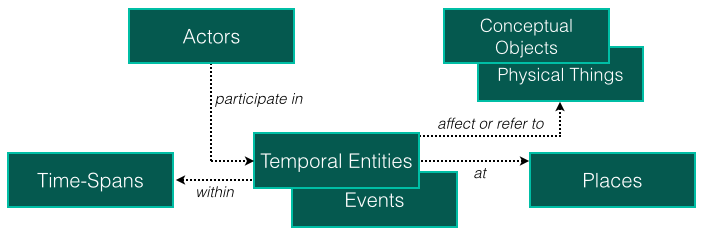
CIDOC-CRM is an event-based ontology where the main entities are related to Temporal Entities. As their name implies, Temporal Entities are concepts related to events in the past and because of this, they are related to a temporal length of events (period), so they can have date and time associated to the Time-Spans entity. The Actors, Conceptual Objects, Physical Thing and Places classes can not be directly linked to time (Time-Spans), so they need to be associated to events (Temporal Entities).

A Place can be anything that describes a location (geographical or e.g., in the bank of the Douro River or on top of Eiffel Tower).

Actors are entities that hold a legal liability. An actor can be an individual or a group; the first one is related to a person and the second one can be associated to a company, for example. Actors interact with things (Conceptual Objects and Physical Things) through events.

A Physical Thing is something that can be physically destroyed and, case some part is preserved, it can be turned into something new. By other hand, Conceptual Objects can not be crashed. For instance, a physical thing like a smartphone, or a magazine can be destroyed, but the information (content) related to that physical thing can not. To destroy a Conceptual Object it is necessary to extinguish the source, i.e., anything that represents that concept, including people.

Things in CIDOC-CRM can have Appellations. They can be a name, an identification number, etc. Furthermore, different organizations have distinct classification types. In CIDOC-CRM, these classifications are called Types and they classify things. For instance, events can have diverse types like birth, marriage, race, earthquake, flood, war, etc. Both Appellations and Types can be related to any entity.
Actors Time-Spans TemporalEntities Places ConceptualObjects

Instantiation of Emigration Museum Assets in CIDOC-CRM

An example


instantiation

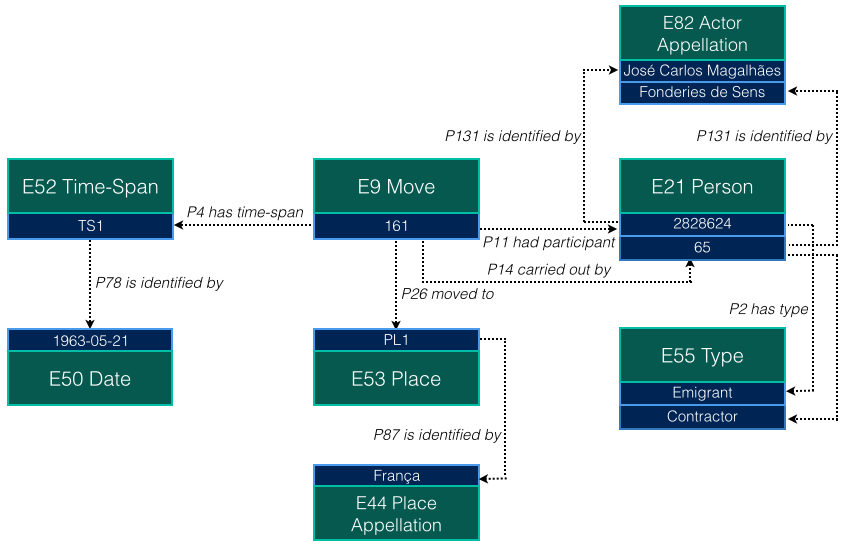
The main event is E9 Move, which refers to the emigration document that reflects a passport application form identified by the number 161. E9 Move has four relations describing:

  • when the movement has occurred: described by E52 Time-Span identified by TS1, which in this case (P78) is identified by the 1963-05-21, an E50 Date;
  • where the emigrant moved to: described by E53 Place identified by PL1, which in this case (P87) is identified by França, an E44 Place Appellation;
  • who emigrated: described by E21 Person identified by 2828624, an E21 Person, which in this case (P131) is identified by an E82 Actor Appellation José Carlos Magalhães. The E21 Person in this case has a type to identify its role in the E9 Move. So the person identified by 2828624 (P2) has type Emigrant;
  • who carried out: described by E21 Person identified by 65, an E21 Person, which in this case (P131) is identified by an E82 Actor Appellation Fonderies de Sens. The E21 Person in this case has a type to identify its role in the E9 Move. So the person identified by 65 (P2) has type Contractor; notice that it is not possible to determine, from the sources, whether the contractor is a person or a company (E74 Group). So, it is always described as an E21 Person.

TXT2CIDOC


To define and use an ontology, an explicit representation should be adopted. There are several representation languages that can be used for that purpose, like eXtensible Markup Language (XML), RDF, Web Ontology Language (OWL), among others. They vary in expressiveness.

The CIDOC-CRM ontology can be described in such languages, but usually it is in RDF. The creators of CIDOC-CRM have chosen RDF aiming at an easy understanding by both computer experts and non-experts. So in this work RDF is used to instantiate the emigration documents.

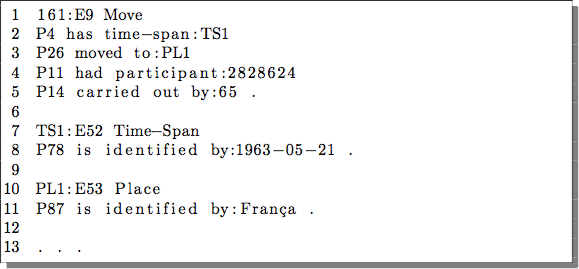
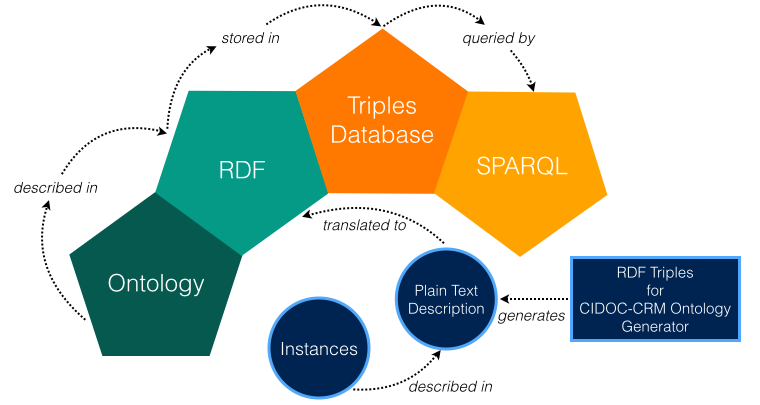
So, as a first step, was created a description in plain text to specify the triples (subject, predicate, object) representing the emigration assets and also to realize how the assets can be described in triples. After understanding the process of describing the documents into plain text triples, they are translated – through a compiler made in ANTLR – into RDF notation, so the information can be extracted by SPARQL.


1

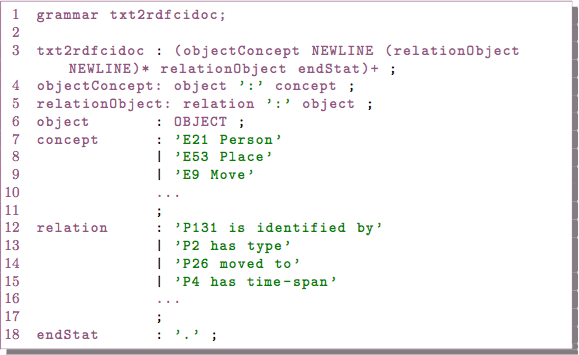
The first step in this case was to create a grammar in ANTLR that recognizes a language defined by us to facilitate the specification of the triples.


At this moment, having the grammar specified, it is possible to create the plain text description to be parsed to RDF notation through the ANTLR compiler. The text description is an example of the instantiation of Emigration Museum assets detailed above. It can be specified in two ways:

  1. directly in a text editor; or
  2. through the RDF Triples for CIDOC-CRM Ontology Generator;

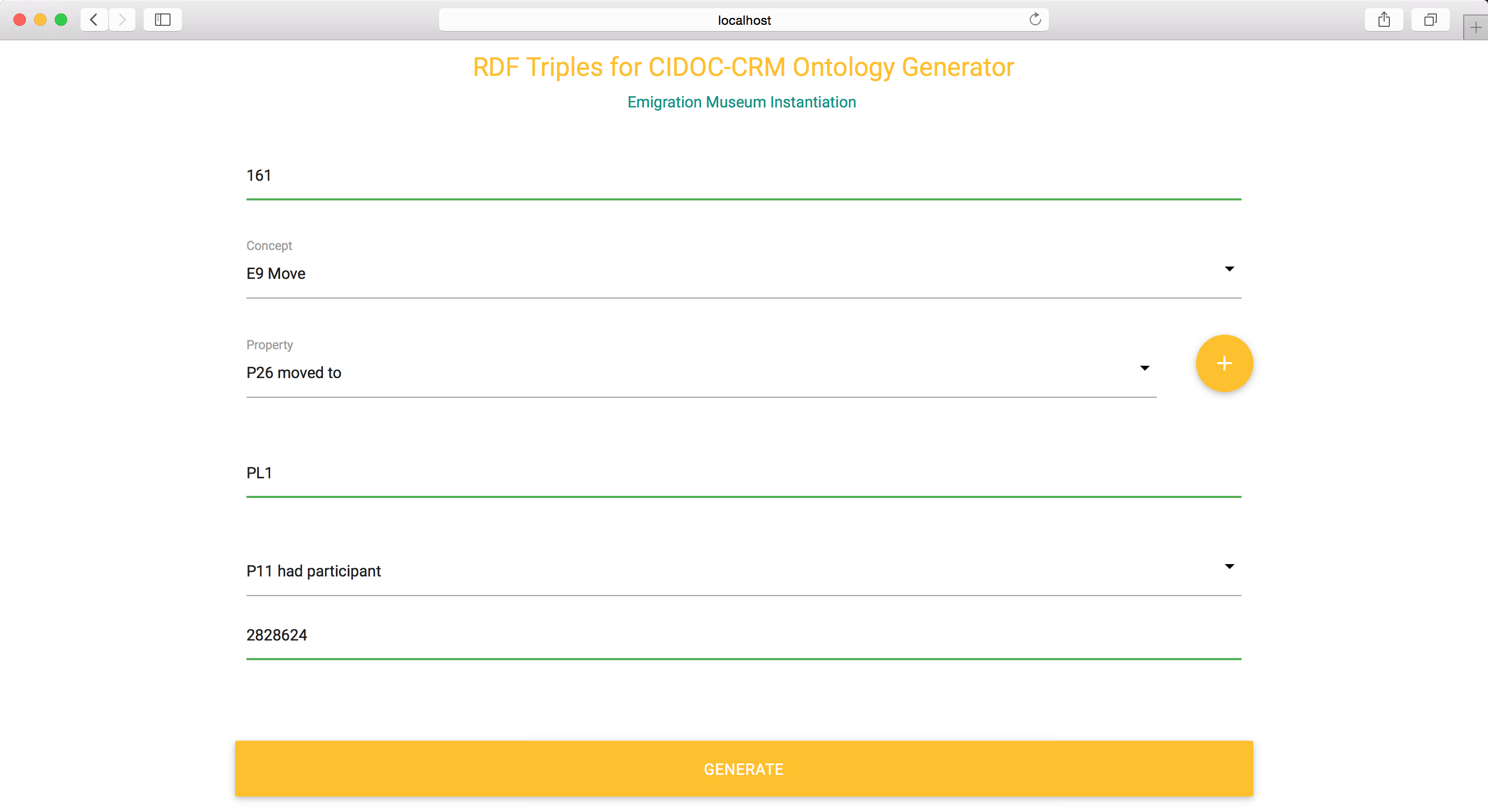
RDF Triples for CIDOC-CRM Ontology Generator is a web application with the purpose of aid in the creation of the plain text description. It can be seen in the next step image.

2


3

Now it's needed to translate the plain text description to RDF. A parser made in ANTLR do the job. It's represented in the image on the right in the translated to relation.


3.1

The RDF Triples for CIDOC-CRM Ontology Generator can be seen in the image on the right.

Its objective is to aid in the creation of the plain text triples to be parsed by the ANTLR compiler.


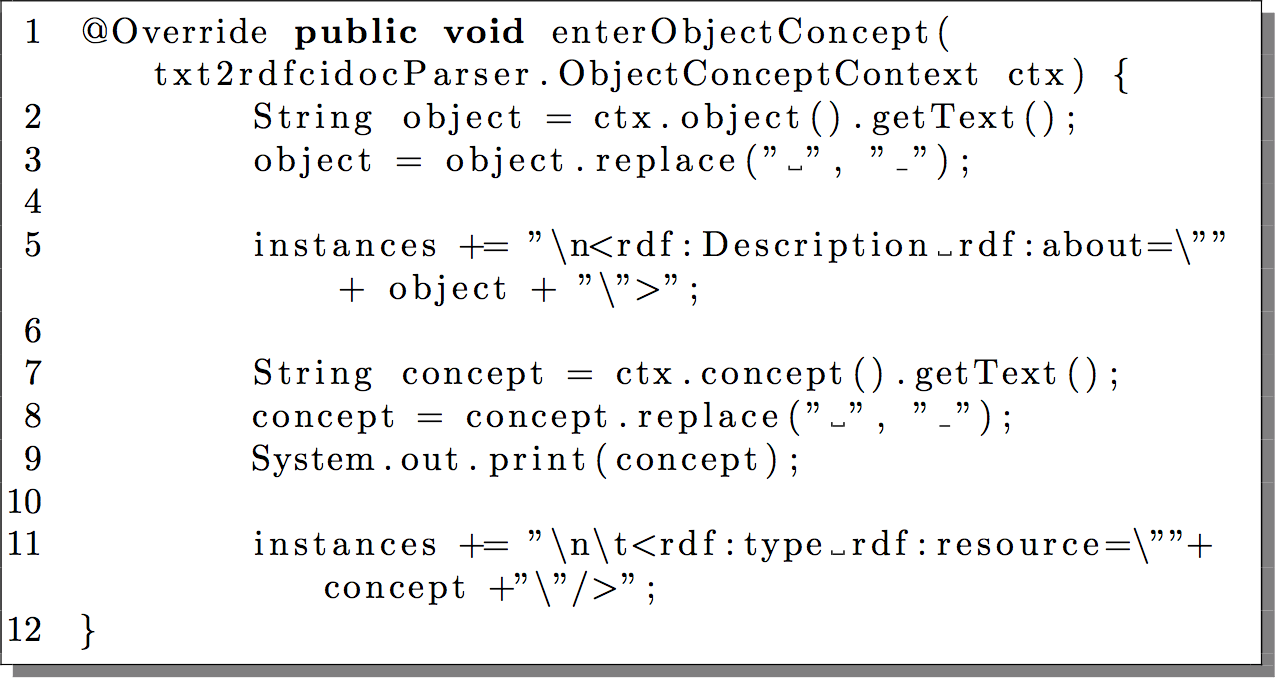
The compiler gets the text description as input to be recognized by the grammar and generates the triples into RDF. The compiler listen to each production of the grammar through listeners in ANTLR. Listeners are methods that can be implemented for the entry and exit of each production, producing the desired output. The snippet on the left shows an entry method
@Override public void enterObjectConcept(...);
that gets the object production text and replaces any white space by the underline "_" character. After that, it concatenates the object text to the instance String. The same is done with the concept production. Notice that the instance String is always concatenated for each entry and exit of the productions and it is stored in an RDF file at the end (when listen to the exit method of the "txt2rdfcidoc" production).

4


5

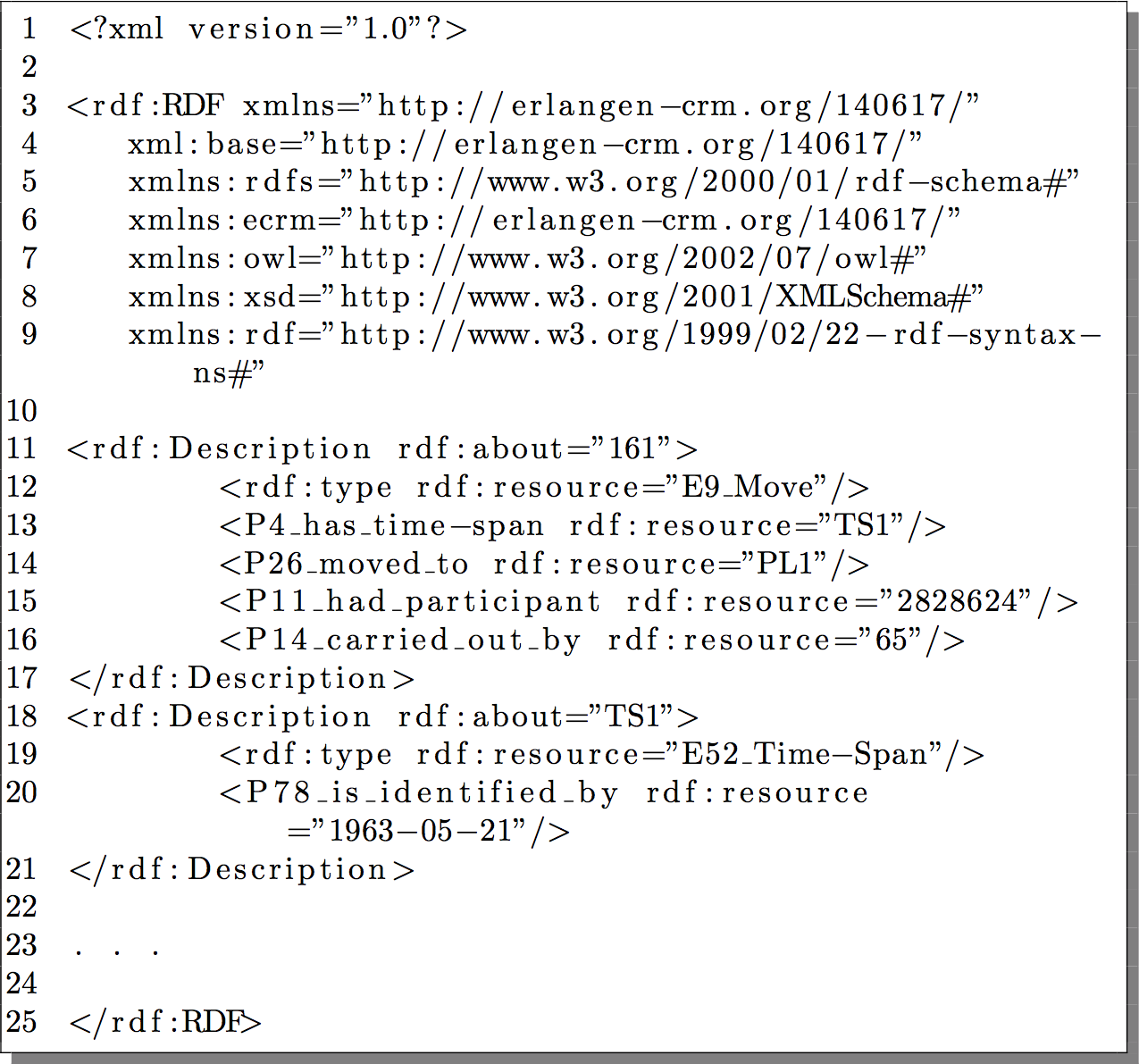
Finally, the RDF triples instantiation are created. The image on the right shows a snippet of the RDF file.

Now the RDF triples can be queried by SPARQL.


But to inquiry the RDF triples with SPARQL, it is needed to store them into a triple store mechanism and expose the triples in an end-point SPARQL accessible over HTTP. We have choose the Jena Apache TDB and Jena Apache Fuseki 2.0.

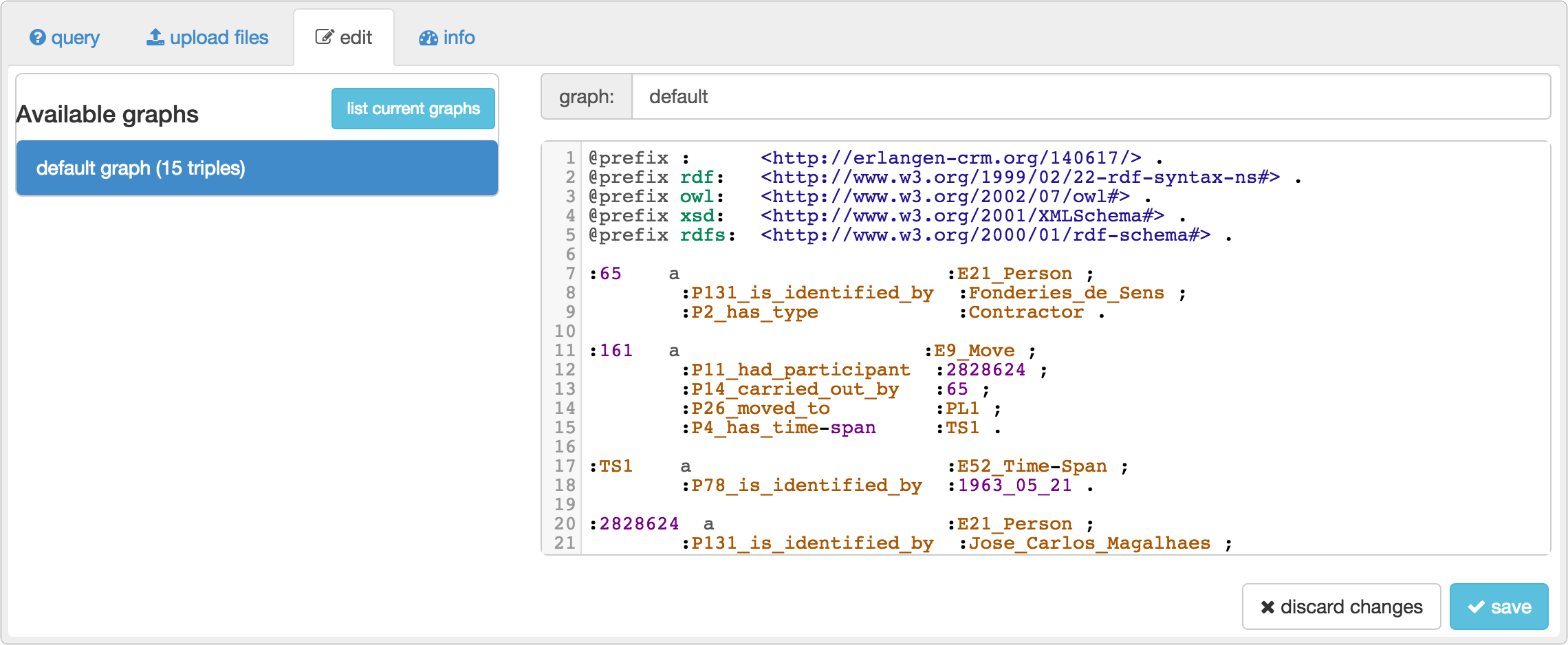
The image on left shows the generated triples in Turtle syntax that reflects the RDF file generated in step 5.

6


7

From here, it's possible to query the triples stored in Apache Jena TDB over a dataset running at http://localhost:3030 (Fuseki 2.0 end-point)

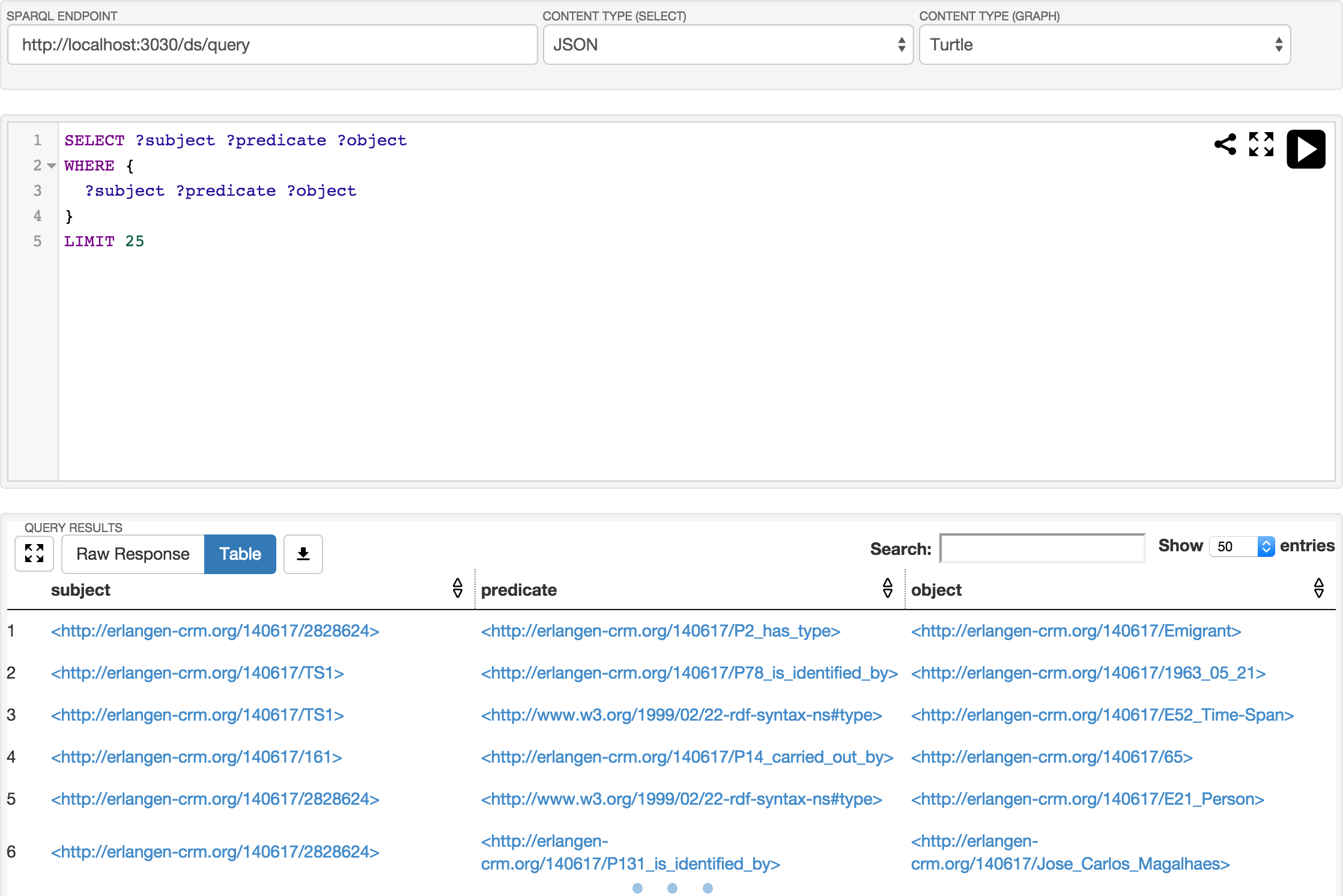
The image on right shows an example of a SPARQL query and its result.